 Ahmed Alaydi
Morshed Platform Management System
Centralized administration for users, education, content, access, and platform operations.
- Role
- Backend Architecture & Full-Stack Development
- Timeline
- Production
- Industry
- Educational Platform Administration System
- Status
- Production
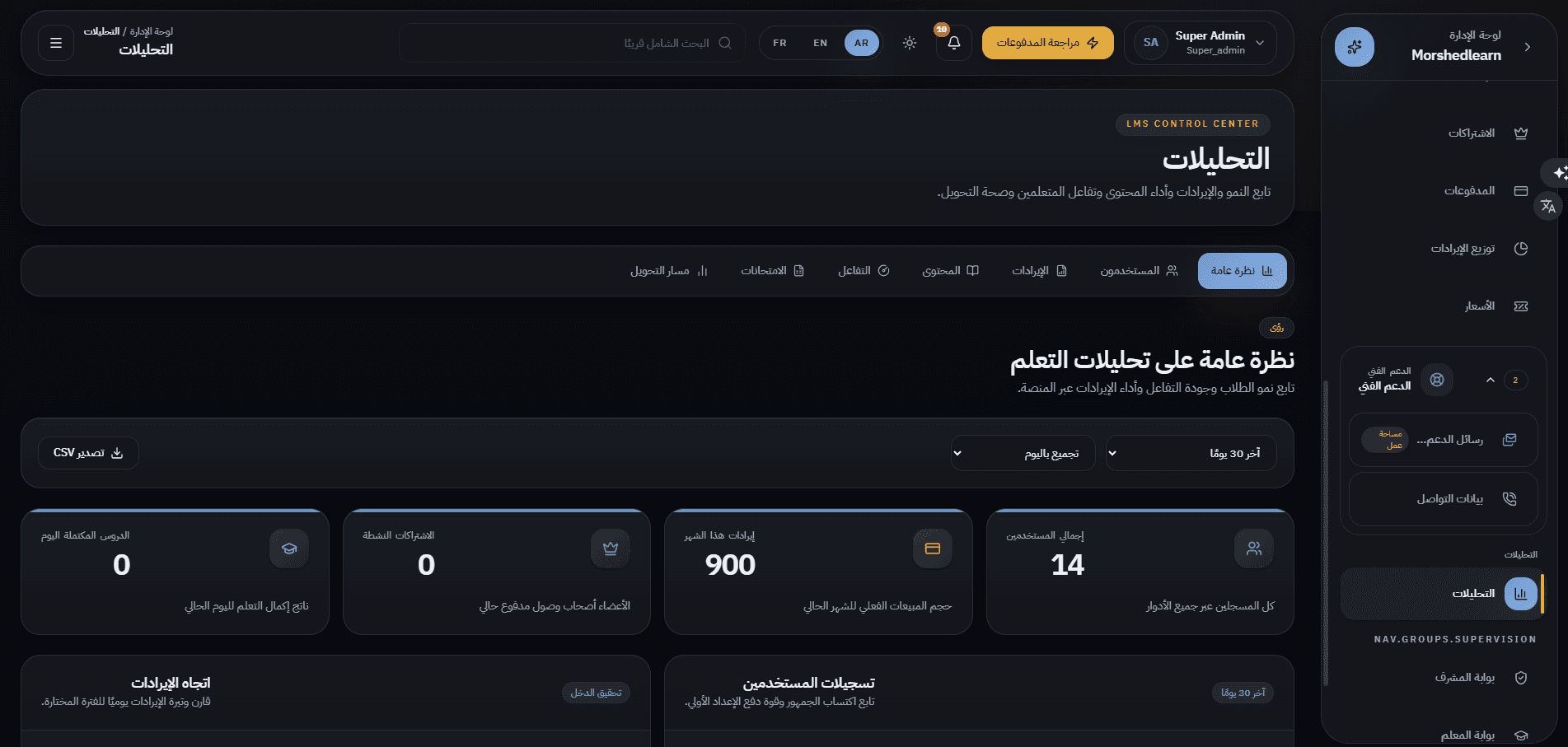
What this system is
Morshed is a Sudanese educational platform, and this is the system that operates it. The administrative environment is organised as workspaces rather than as one flat menu: user workspaces for students, parents, course buyers, teachers, supervisors, and admins; a curriculum workspace holding grades, subjects, chapters, lessons, the video library, exams, and the grading queue; a content workspace for standalone courses and materials; a business workspace for packages, subscriptions, pricing, payments, and revenue distribution; a CMS workspace that authors the public site; support and analytics; and separate scoped portals for supervisors and teachers. Every one of those reads and writes the same accounts, the same curriculum tree, and the same entitlement rules, which is what makes an answer like "what is this student allowed to open" a single lookup rather than a reconciliation.
What we needed to solve
An education platform is several products at once — an identity system, a curriculum, a media library, an assessment engine, a billing surface, and a marketing site. Run those from scattered tools and the same questions become unanswerable: which content is a given student entitled to, which attempts still need a human marker, which package granted this access, and who changed the page the public sees.
How we shipped it
One administrative environment where every one of those concerns is a module of the same system, sharing the same accounts, the same curriculum tree, and the same entitlement rules. Roles decide what each operator can reach, supervisors and teachers get their own scoped portals instead of the full admin, and the content that drives the public site is edited as data — so the platform can change without a frontend deployment.
How the system is wired
The management system owns the data and the rules; the public platform consumes them over a REST boundary. Keeping the two as separate deployables — and separate portfolio entries — is deliberate: the frontend can be rebuilt without touching operations, and operations can gain a module without a frontend release. What follows is the direction of dependency, not a description of one merged application.
Where the platform is operated: accounts and roles, curriculum, courses, exams, packages, payments, and site content.
A single relational model of users, the grade-subject-chapter-lesson tree, media, assessments, and entitlements.
The contract the public platform reads through, so no client depends on the database schema directly.
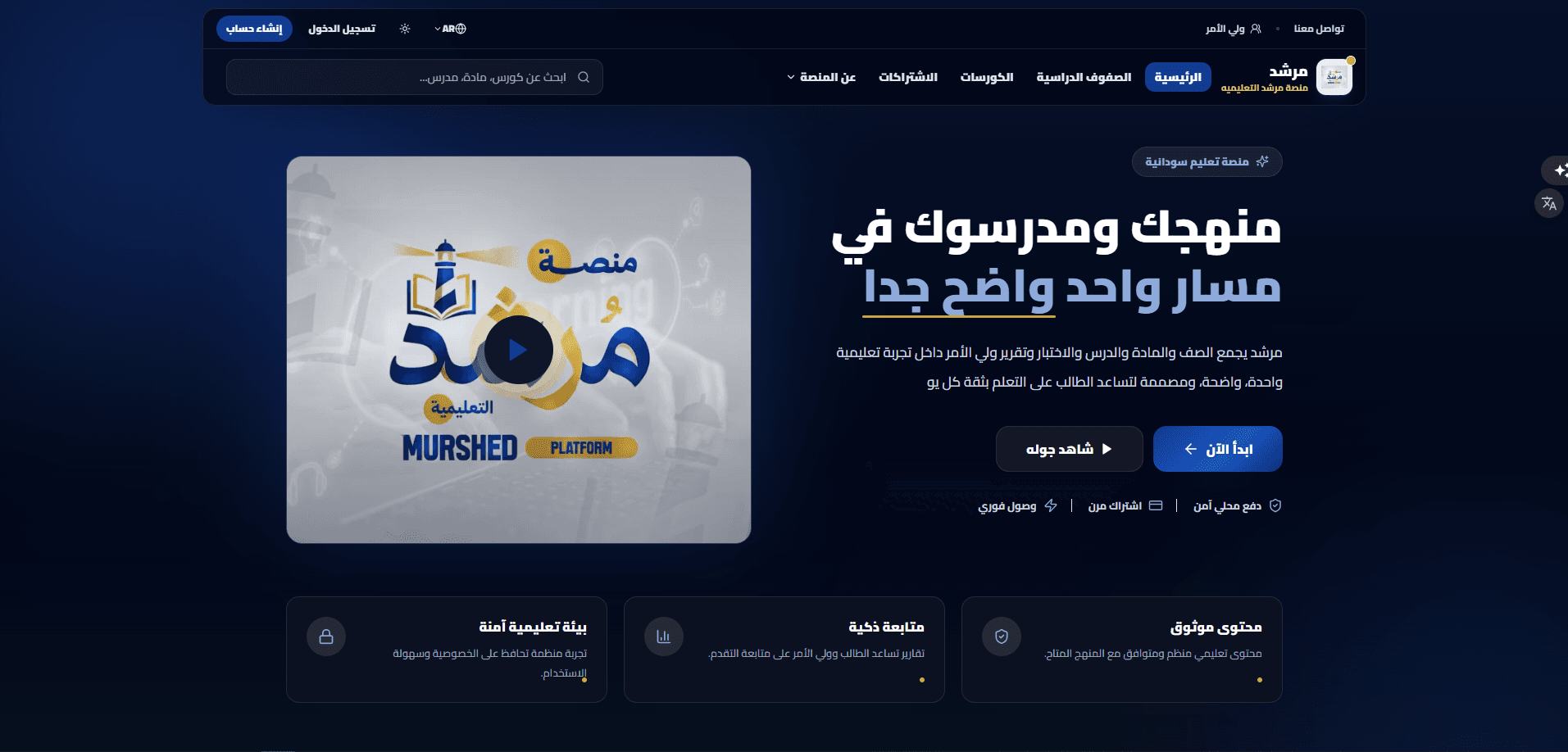
The student and parent web frontend, rendering only what the operator's data and the entitlement rules allow.
Engineering choices
In the wild
Services and data
Rather than one user table behind one screen, each role gets its own workspace with the fields that role actually has: students carry a grade, a parent link, and a subscription state; parents carry linked children; teachers carry a specialisation and course count; supervisors carry the grades assigned to them. A cross-role view sits over all of them for global search.
Grades are the top-level stage; each grade groups its own subjects, each subject its chapters, and each chapter its lessons — with explicit ordering, a free/trial flag, and an active state at every level. The tree is what the frontend walks to build a student's syllabus.
A video library holding every asset uploaded through lessons and course chapters, with duration, size, and a per-asset processing state that can be retried. Assets are addressed from the curriculum rather than duplicated into it.
Exams attach to a lesson, subject, or course and carry duration, attempt limits, pass score, and publication state. Objective questions are marked automatically; anything written lands in a review queue for a human marker.
Access packages define what a purchase actually grants — a single course, a set of courses, or a whole stage — for a defined duration. Pricing carries list price, discount, and final price; payments record the gateway, status, and reference, and support refunds and CSV export.
The public site's pages are stored as structured blocks — hero, story strip, mission and values, founding team, experience cards, closing call to action — each independently editable and countable, so marketing changes do not require a frontend deployment.
Reviews submitted by users enter a pending queue and only appear publicly once approved, with the reviewer, rating, submission date, and accept or reject action recorded.
A supervisor signs in to their own portal covering only their assigned grade: learner counts, average progress, progress distribution, exam attempts, parent messages, and alerts for learners falling behind — read-only, with actions reserved for administration.
External surfaces
The public web frontend consumes the platform over REST, which is what allows the two to ship on independent release cycles.
Successful and failed transactions are stored with gateway, reference, amount, currency, and product, filterable by state and date and exportable to CSV.
The administrative interface itself runs in Arabic, English, and French, with the layout mirroring for Arabic rather than only swapping strings.
What admins control
Students, parents, course users, teachers, supervisors, admins, and a cross-role view over all accounts.
Stages, grades, subjects, chapters, lessons, the video library, exams, and the pending-review queue.
Standalone courses and educational materials, administered separately from the school curriculum.
Access packages, subscriptions, the pricing centre, payments, and revenue distribution.
The public home page, the about page, the FAQ, and moderation of submitted reviews.
Support messages, contact details, and analytics across users, revenue, content, engagement, exams, and conversion.
Supervisor and teacher portals that expose only the grades and learners assigned to that operator.
Hard problems, handled
Five user types with genuinely different shapes risked collapsing into one generic account screen.
Each role received its own workspace with the fields it actually carries, and a cross-role view was added on top for global search and review.
Content had to serve both a structured school curriculum and standalone commercial courses.
The two were modelled separately — a grade-based tree and a course catalogue — while sharing the same media library, exams, and entitlement rules underneath.
Marketing copy on the public site kept requiring frontend releases.
Page sections were moved into the CMS as structured, individually editable blocks, leaving the frontend responsible for rendering rather than for wording.
Academic supervisors needed oversight without administrative reach.
A dedicated read-only portal scoped to their assigned grade, showing progress distribution, exam attempts, and at-risk alerts, with all actions reserved for administration.
Built to stay fast
Design and interaction
Ready to ship and operate
What it does
Students, parents, teachers, supervisors, and administrative users, each managed in a workspace shaped to their role, with status, last sign-in, and per-account actions.
A student account carries its academic grade, its parent link, and its subscription state — the same three facts that decide what the frontend will show that student.
Parents are a first-class account type with their own record and a count of linked children, which is what lets the public platform offer a genuine parent dashboard rather than a shared login.
Teacher accounts with specialisation, subject and course counts, and the instructor information surfaced on the public course pages.
Top-level curriculum stages with ordering, a stage grouping, a subject count, and an active state — the spine the rest of the curriculum hangs from.
Subjects belong to a grade and chapters belong to a subject, each with its own ordering, lesson count, and publish state.
Lessons sit inside a chapter and carry a title, type, duration, ordering, a free-or-trial flag, and an active state, with their curriculum path visible at a glance.
Every video uploaded through a lesson or a course chapter, reviewable in one place with duration, size, processing state, and the ability to retry, reorder, or remove.
Standalone courses administered apart from the school curriculum: catalogue, instructor assignment, pricing with sale prices, level, language, featured state, and publishing.
Assessments for lessons, subjects, and courses with control over duration, maximum attempts, pass score, scheduling, and publication.
Attempts that were auto-marked for their objective questions but still need a human decision on essay and short-answer responses, collected in their own queue.
Access packages, active subscriptions, and a pricing centre covering package and course pricing, discounts, and final price, so content access is an entitlement rather than a shared link.
Revenue, refunds, and transaction records by gateway and status, with period filtering, revenue distribution, and CSV export.
The public home page, about page, FAQ, and testimonials are authored here as structured blocks, so the site's copy and sections change without touching frontend code.
Platform notifications are part of daily operations, surfaced in the administrative shell alongside the work they refer to.
Student, parent, teacher, supervisor, and admin are distinct roles with distinct reach. Supervisors and teachers do not receive a reduced admin — they receive their own portal, scoped to the grades and learners assigned to them.
Overview, users, revenue, content, engagement, exams, and conversion, over a selectable period and grouping, with CSV export.
Why we chose what we chose
Separate the admin system and the public platform into two deployables.
The frontend and the operations system change for different reasons and at different rates. A REST boundary between them means a marketing change, a curriculum change, and a UI change never have to ship together — and it is why this portfolio presents them as two case studies rather than one.
Model the curriculum as an explicit four-level tree.
Grade → subject → chapter → lesson, each with its own ordering and publish state, is what turns a media library into a syllabus. The frontend can render a student's whole path by walking the tree instead of relying on hand-maintained links between videos.
Give each role its own workspace instead of one filtered user table.
A parent record is not a student record with fields hidden. Modelling them separately means the columns that matter — linked children, assigned grades, specialisation, subscription state — are first-class, and the cross-role view exists for the cases that genuinely need one list.
Route written answers to a human review queue.
Objective questions can be marked the moment an attempt is submitted; essay and short-answer questions cannot. Splitting the two keeps automatic marking instant while making the outstanding human work visible as a queue rather than an unknown.
Make access an entitlement granted by a package, not a link.
Packages define scope and duration explicitly — one course, a set of courses, or a full stage — so what a learner may open is derived from what was purchased, and revoking or expiring access is a data change rather than a hunt for shared URLs.
Author public site content as structured blocks in the CMS.
The home and about pages are stored as discrete, countable sections rather than as a blob of markup, so the operator edits meaning and the frontend keeps control of presentation. Copy changes stop requiring a developer and a deployment.
Give supervisors a scoped read-only portal.
Academic supervision needs visibility, not administrative power. A separate portal limited to the assigned grade — with progress distribution and at-risk alerts, and actions left to administration — is safer than granting admin access and hiding buttons.
Results
The platform this system operates
Everything administered here — accounts, curriculum, courses, exams, entitlements, and site content — is rendered to students and parents by the Morshed web frontend, which ships as its own case study.
The live link opens the public web platform. The administrative system itself is not publicly reachable.
Other case studies
Building something similar?
Let's scope your platform — dashboard, mobile apps, APIs, the full stack.