 Ahmed Alaydi
PS Cafe Pro — Multi-Tenant Gaming Venue SaaS & POS Platform
One platform running many gaming venues: isolated tenant workspaces for stations, sessions, cafeteria POS, inventory, customers, shifts and treasury — with a platform plane above them for plans, subscriptions, alerts and support.
- Role
- Full-Stack Engineer
- Timeline
- Production System
- Industry
- Gaming Venue Operations SaaS
- Status
- Production Ready
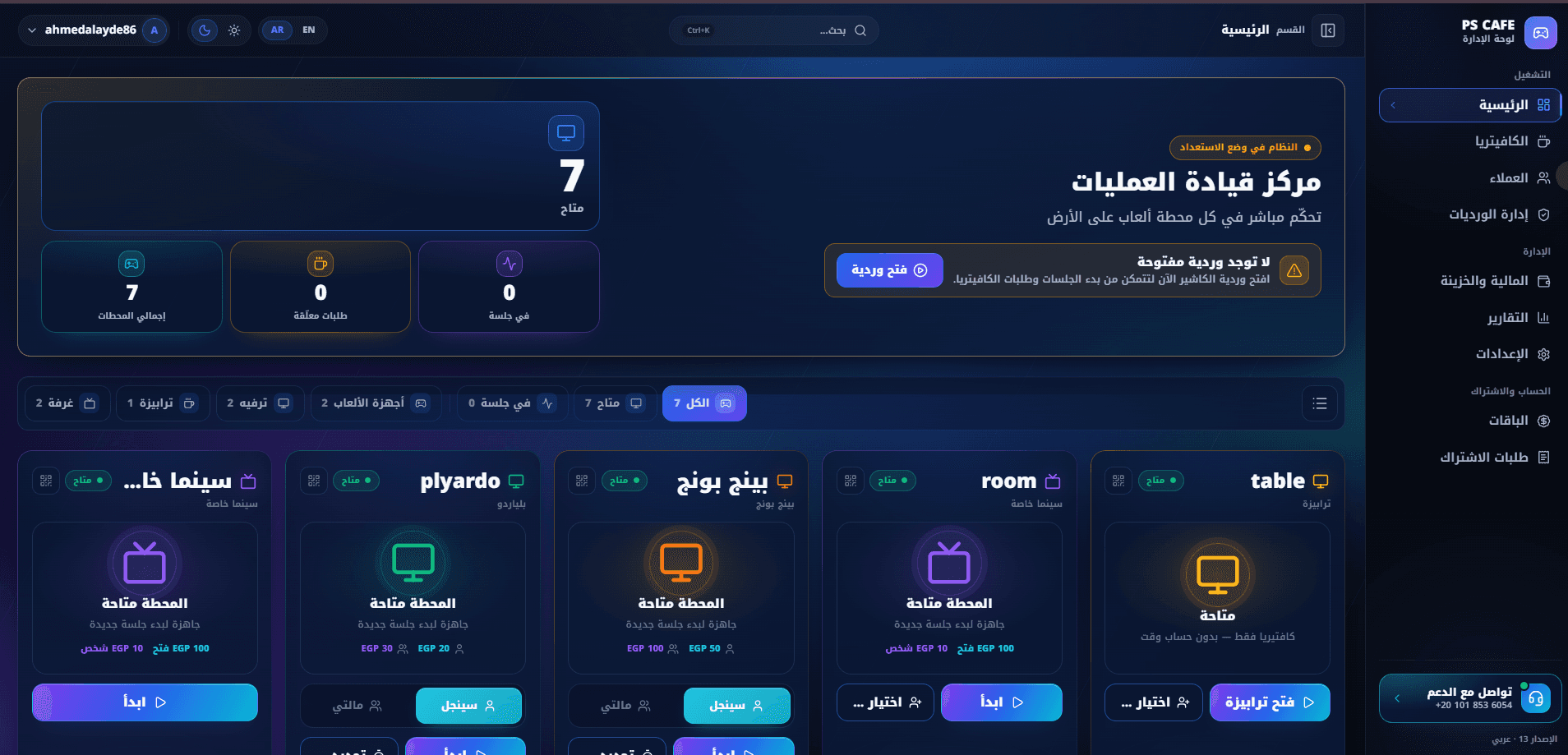
What this system is
PS Cafe Pro is a subscription product, not a single installation. The same codebase serves every venue on it, and each venue sees only its own stations, sales, staff, customers and money. Inside a venue the platform covers the full operating day: open a shift, start sessions on stations priced by the hour or by the match, sell from the cafeteria with or without a session attached, draw stock down through recipes so cost and margin are known per item, take mixed payments, settle debt, close the shift against a counted drawer, and read the day back as revenue, profitability and an audit trail. Above all of that, the platform plane administers the business of the product itself — plans and prices, trials and renewals, access states, operational alerts across every venue, broadcast announcements, and impersonation so support can see exactly what a venue sees.
What we needed to solve
A gaming venue makes money in two different ways at once — time on a station and items sold at the counter — and both have to land on the same session, the same shift and the same customer without ever double-counting. Doing that on paper or in a spreadsheet fails quickly: sessions get transferred between stations mid-play and lose their pricing, a customer pays partly in cash and partly from credit and the remainder is forgotten, a price is edited today and last month's invoices silently change with it, an order gets submitted twice because the counter was busy, and a shift closes without anyone recording that the drawer was short. Selling that system to many venues multiplies the problem: trials, renewals, expiry and per-venue support all have to be handled somewhere, and without a platform layer they become manual work.
How we shipped it
One multi-tenant platform with two clearly separated planes. The tenant plane gives each venue its own operations console: stations with individual price lists, sessions billed by the hour or by the match, a cafeteria POS that works with or without a session, inventory tied to recipes so product cost and margin are real numbers, customers whose credit and debt stay separate, and shifts that gate every money-moving action. The platform plane gives the operator a dashboard over all venues: plans and pricing, subscription and trial lifecycle, access state, an alerts centre that surfaces anomalies such as shifts left open for days, announcements, and impersonation for support. Correctness is enforced in the data layer rather than in the UI — money-moving work runs inside database transactions, order submission is idempotent, and prices are snapshotted onto the record they priced so history never rewrites itself.
How the system is wired
The system is a single Next.js application with two authorisation planes over one PostgreSQL database. Every tenant-scoped table carries a venue key, and every query path resolves that key from the session rather than from anything the client sends, so tenancy is enforced at the data boundary instead of being trusted from the UI. Mutations run through Server Actions rather than a public REST surface: validation, permission checks and the transaction all live on the server in one place, and the client never holds a token that could be replayed against a raw endpoint. Anything that moves money — closing a session, submitting an order, settling debt, closing a shift — runs inside a database transaction, and the price that applied at the moment of the operation is written onto the record rather than looked up again later.
Every request resolves the signed-in user to exactly one venue and one permission set. Tenant scope is applied server-side on every read and write, so a missing filter is a data-layer error rather than a leak.
All mutations enter through Server Actions. Input is validated, permissions are checked, and the work is wrapped in a transaction before anything is written — there is no second, weaker path into the data.
Pricing, sessions, orders, inventory, credit and shifts are separate rule sets with explicit boundaries: promotions touch hourly contexts only, rewards are earned from paid time only, and debt never nets against balance.
A relational schema with transactional integrity, historical price snapshots on priced records, and idempotency keys on order submission so a repeated request resolves to the same invoice instead of a second one.
A separate administrative surface over all tenants: plans, subscription and trial lifecycle, access state, alerting, announcements and impersonation — never a privileged mode of the venue app.
Engineering choices
Platform Administration
The plane above the venues. From here the operator sells the product, not the gaming time: plans and prices, who is on trial and for how long, who has lapsed, what is going wrong across the estate, and a way into any venue when support is needed.
Live vitals across the whole estate — venues on the platform, critical issues needing attention, sessions running right now and revenue booked today — with a second row for paid subscriptions, open shifts, active trials and expired accounts.
Every venue in one table with its subscription state — active, trial with days remaining, or expired — alongside device and user counts. Each row carries the operator's actions: sign in as the venue, extend the trial, mark as paid, cancel, or delete.
Monthly, yearly and lifetime plans, each with a previous price shown struck through, a featured flag for the plan being pushed, visibility states (visible, hidden, archived) and manual ordering.
Access state per venue, filtered by active, expiring, lifetime, expired, legacy paid or trial. Owner emails are masked by default — support does not need the full address to do its job.
Anomalies surfaced across every venue rather than waiting to be reported. Here, shifts left open far past a day, ranked by severity and duration, each with its venue, owner and a direct way to sign in and resolve it.
A broadcast to every venue or a chosen audience, with a severity level attached so an informational notice does not arrive looking like an outage.
Tenant / Gaming Venue Operations
What a single venue sees after signing in. This is a separate workspace, not a filtered view of the platform: the stations, customers, stock, staff, shifts and money below belong to one venue and are invisible to every other tenant on the platform.
Each venue signs into its own isolated workspace. The panel states the product's promise plainly: live sessions, access scoped to the tenant and the permission set, and one place to run the floor.
The floor at a glance — stations grouped by type (gaming devices, entertainment, tables, rooms), how many are in session, and how many orders are pending. Nothing can start until a shift is open, so the screen gates itself with an explicit no-open-shift state rather than failing later.
Direct sales that are not attached to any device session, with stock-aware product tiles (available, low, out), category filters and a running invoice. Like every money-moving screen it stays locked until a shift is open.
Opening a session asks only for what changes the price: billing method (by the hour or by the match), play mode (single or multi), and the customer. The resolved rate is shown before confirming, so the cashier never has to guess what the session will cost.
Balance and debt are two separate fields on the customer, never one net number. A customer can hold credit and owe money at the same time, and the screen refuses to hide that behind a single figure.
A shift starts with an opening float; every session, sale and expense after that belongs to it. Closing compares the expected total against what was actually counted and records the difference rather than quietly absorbing it. Closed shifts stay in the log with who opened them and what the gap was.
Every deposit and withdrawal in one ledger with a running net, filtered by employee, type and date, so each movement of cash is traceable to a person and a moment instead of appearing as an unexplained total.
Device revenue, cafeteria revenue, deposits and expenses resolved into a net result over a date range or a single shift, with the underlying invoices listed beneath and product profitability exportable for outside analysis.
Receipt printing configured for A4, 80mm and 58mm thermal paper, with printer selection and copy count, alongside data management, general settings and discount rules.
Each station carries its own price list — single and multi hourly rates, single and multi match prices, a room opening fee plus a per-person charge — and stations that only serve cafeteria orders are marked as carrying no session price at all. Every card keeps a price history. Shown here in the light theme.
Promotions apply to hourly contexts only, as either a discount or a fixed hourly price. Match pricing is explicitly out of scope, stated on the screen itself, so a promotion can never silently rewrite a fixed-price match.
Rewards are earned from paid time only and spent inside the same session. That single rule is what keeps the engine non-recursive: a reward can never itself earn another reward.
Finished products and raw materials tracked separately, each with its own shortage view. Cost sits next to price so margin is visible per item — including when it is negative, which the table shows rather than hides — and anything built from a recipe is flagged as such.
Ten named permission scopes — inventory, reports and sales, treasury and finance, cafeteria, monitoring and sessions, discounts, system settings, shift management, team, and devices and pricing — granted per user, with full-access admins clearly distinguished from custom roles.
Every operation inside the venue written in readable language rather than as raw rows: who acted, on what, when, and why. Shift closes, session ends, recipe creation and stock additions all land here, each expandable to its full detail.
Services and data
Every tenant-scoped table carries a venue key, and the key is resolved from the authenticated session on the server rather than accepted from the client. A venue therefore cannot reach another venue's rows even if a request is hand-crafted.
Plans, prices, trials, renewals, lifetime access and expiry are administered on the platform plane. Access state is derived from the subscription record, so extending a trial or marking a venue as paid takes effect without touching the venue's own data.
Session close, order submission, debt settlement and shift close each run inside a database transaction. A failure part-way rolls the whole operation back rather than leaving a half-charged session or a shift that counted some of its sales.
Order submission carries an idempotency key. A duplicate request — a retry, a double tap, a flaky connection — resolves to the invoice that already exists instead of creating a second one.
The price that applied is written onto the record it priced. Editing a station's rate today changes what the next session costs and nothing else; last month's invoices and reports stay exactly as they were.
The platform watches for operational anomalies across every venue — shifts left open for days being the clearest example — and pairs each alert with impersonation so support can enter the venue, see what the staff see, and fix it.
External surfaces
Mutations are Server Actions rather than a public REST surface. Validation, permission checks and the transaction sit together on the server, and there is no long-lived API token on the client to replay.
A typed relational layer over PostgreSQL. The schema — not the interface — is where tenancy keys, foreign keys and transactional guarantees live.
Configurable output for A4, 80mm and 58mm thermal paper, with printer selection and copy count, so the same build works on a full printer or a counter-top thermal unit.
Revenue reports and product profitability export to spreadsheet formats, so an owner who wants to work outside the system is not forced back into it.
Data management is part of the product rather than an operations afterthought: a venue's data can be exported and restored from the settings surface.
What admins control
Revenue split by device and cafeteria, deposits and expenses, resolved to a net result over a date range or a single shift, with the underlying invoices listed and per-product profitability alongside.
A readable record of what happened inside the venue — actor, entity, action, time and reason — covering shift closes, session ends, recipe creation and stock changes, each expandable to full detail.
Ten named permission scopes granted per user: inventory, reports and sales, treasury and finance, cafeteria, monitoring and sessions, discounts, system settings, shift management, team, and devices and pricing. Full-access admins are a distinct state, not a role with every box ticked.
General configuration, discount rules, printing setup and data management, kept behind an explicitly administrative section rather than mixed into the operating screens.
Each venue sees its own plan, its own subscription requests and its own access state — the tenant-side view of what the platform plane administers.
Hard problems, handled
Four pricing shapes on one floor — hourly single, hourly multi, per-match single, per-match multi — plus rooms that charge an opening fee and then per person. Resolving the wrong one is a wrong bill.
Price resolution was moved out of the UI and into a single server-side rule that takes the station, the billing method and the play mode and returns one rate. The cashier sees that resolved rate before confirming, and it is written onto the session so nothing downstream has to resolve it again.
Editing a station's price silently rewrote history: yesterday's invoices and last month's reports changed with it, so no report could be trusted twice.
Prices are snapshotted onto the records they price. A rate change applies to the next session only, and every station keeps a visible price history so a past figure can be explained rather than argued about.
A busy counter double-submits orders. Retries and impatient taps produced duplicate invoices that had to be found and voided by hand.
Order submission became idempotent. A repeated request carrying the same key resolves to the invoice that already exists, so the duplicate simply cannot be created rather than being cleaned up afterwards.
Netting a customer's credit against their debt into one number hid real money. Two customers with the same net figure could be in completely different situations.
Balance and debt are two separate ledgers and are never combined. Settlement runs FIFO against the oldest outstanding amount, so a partial payment always maps to specific charges instead of vanishing into an aggregate.
Sessions move between stations mid-play, and some end up merged. Naively re-pricing at the destination or invoicing both halves produced charges the customer had never agreed to.
Transfer carries the elapsed time and the already-agreed rate rather than re-pricing, and merge produces a single invoice that still records which parts came from where — one bill, with its provenance intact.
A rewards engine that could earn on redeemed value would compound indefinitely, and promotions applied to fixed-price matches would rewrite an agreed price.
Both engines were given hard boundaries instead of guard clauses scattered through the code: rewards accrue from paid time only and are spent in-session, and promotions apply to hourly contexts only. Each boundary is stated on the screen where the rule is configured.
Sessions and sales were being recorded outside any shift, which made the drawer impossible to reconcile at the end of the day.
The shift became a hard precondition rather than a reporting convenience. With no open shift, the operations and cafeteria screens show an explicit blocked state instead of allowing work that would later have nowhere to belong.
Selling the system to many venues turned every trial, renewal and support request into manual work, and problems inside a venue were only discovered when someone complained.
A platform plane was built above the tenants: plans and pricing, subscription and trial lifecycle, access states, impersonation for support, broadcast announcements, and an alerts centre that surfaces anomalies such as shifts open for days before anyone has to report them.
Built to stay fast
Design and interaction
Ready to ship and operate
What it does
Stations are typed — gaming devices, entertainment units, tables and rooms — and each carries its own price list rather than inheriting a global rate. A station can also be marked as cafeteria-only, meaning it takes orders but is never billed for time, which removes an entire class of accidental time charges.
Four pricing shapes coexist on one floor: hourly single, hourly multi, per-match single and per-match multi, plus rooms that charge an opening fee and then a price per person. The rate is resolved from the station and the chosen mode at the moment the session opens, shown to the cashier before confirmation, and written onto the session so a later price change cannot rewrite it.
A session can move to another station or fold into another session mid-play. Transfers carry the elapsed time and the rate that was already agreed rather than re-pricing at the destination, and merges combine consumption without producing two invoices for the same play — the outcome is one bill that still explains where each part came from.
Orders attach to a running session or stand alone as a quick sale. Submission is idempotent: a retried or double-clicked order resolves to the same invoice rather than creating a second one, which is what keeps a busy counter from silently charging twice.
Finished products and raw materials are tracked as separate stocks with separate shortage views, because running out of a sellable item and running out of an ingredient are different operational problems that need different alerts.
A product can be defined by a recipe over raw materials. Selling it draws the ingredients down and derives its cost from them, so the margin shown next to the price is a computed number — and when the cost exceeds the price, the negative margin is displayed rather than clamped to zero.
Customers are first-class records that sessions, orders and payments attach to, so a regular's history is one timeline instead of scattered receipts. A session can also run for a guest, which keeps the fast path fast.
Balance and debt are two independent ledgers on the same customer and are never netted into one figure. Debt settles FIFO — the oldest unpaid amount clears first — so a partial payment always maps to specific historical charges instead of an ambiguous lump.
One invoice can be settled from several sources at once — cash, customer balance, and the remainder left as debt. Each part is recorded as its own movement, which is what lets treasury, customer balance and outstanding debt all stay correct after a split payment.
A shift opens with a declared float and becomes the container for every session, sale and expense that follows. Until one is open, the operations and cafeteria screens refuse to transact. Closing reconciles expected against counted and stores the difference as part of the shift record.
Deposits and withdrawals form a single ledger with a running net, attributable by employee, type and date. Cash movement is therefore explainable after the fact rather than inferred from a closing total.
Promotions apply a discount or a fixed hourly price, and only to hourly contexts. Per-match pricing is deliberately excluded so a promotion can never quietly alter a fixed-price match — a boundary the UI states out loud rather than leaving to documentation.
Rewards accrue from paid time only and are redeemed within the same session. Both halves of that rule matter: earning only from paid time stops free time from generating value, and spending in-session stops a reward from ever earning another reward.
Why we chose what we chose
Server Actions instead of a public REST API.
Validation, permission checks and the transaction belong together. Keeping them in one server-side path removes the second, weaker entry point that a separate API surface would create, and leaves no replayable token on the client.
Tenancy enforced in the data layer, never in the UI.
A filter that lives in a component is one refactor away from being dropped. Resolving the venue key from the session on every query makes a missing scope a server-side failure rather than a silent cross-tenant read.
Snapshot prices onto the records they price.
A report that changes when someone edits a price is not a report. Snapshotting makes history immutable and makes price changes safe to perform during trading hours.
Keep credit and debt as two ledgers.
Netting them destroys information the venue actually needs. Two ledgers plus FIFO settlement means every payment can be traced to the charges it cleared.
Make the shift a precondition, not a report.
If sales can exist outside a shift, reconciliation is guesswork. Gating transactions on an open shift means the drawer can always be explained.
Bound the promotions and rewards engines by rule, not by patch.
Promotions on hourly contexts only, and rewards earned from paid time and spent in-session, are boundaries narrow enough to reason about. A more permissive engine would need recursion guards and would still surprise people at the counter.
Separate the platform plane from the tenant app.
Administering subscriptions is a different job with a different audience. Building it as its own surface keeps operator tooling out of the venue's product and keeps impersonation an explicit, auditable act.
Results
Other case studies
Building something similar?
Let's scope your platform — dashboard, mobile apps, APIs, the full stack.