 Ahmed Alaydi
A corporate website, rebuilt as a business platform.
A multilingual custom CMS, a storefront, a CRM inbox and a REST API in one Laravel platform — with a Next.js frontend that reads every word of the public site from it.
- Role
- Full-Stack Developer
- Timeline
- Production System
- Industry
- Corporate CMS / E-Commerce / CRM
- Status
- Production Ready
What this system is
Yusr Advanced Business began as a corporate website and became the system the business runs on. The rebuild moved every piece of public content out of code and into records an editor owns: the hero slider, the company profile, each business sector and its own detail page, the Noor project, financing options, services, projects, the navbar, the footer, the inner pages and the blog. Around that content layer the platform grew a storefront, customer accounts, an enquiry inbox and a notification centre — so the same admin panel that publishes a headline also processes an order and answers a financing request. A REST API exposes all of it to a Next.js frontend, which means the public site renders live content rather than a snapshot compiled at build time.
What we needed to solve
The company's website was static: every headline, sector, service and image lived in code, so the smallest content change needed a developer and a deploy. There was no storefront, no customer accounts, and no single place for the enquiries the business actually ran on — contact messages, quotation requests, consultations, financing applications and maintenance requests all arrived through scattered channels. Adding a language, a sector or a product line meant rebuilding pages rather than adding records.
How we shipped it
A Laravel platform with an Inertia + React admin panel that owns every piece of site content, plus a Next.js frontend that reads it through a REST API. Each content block is a record with its own translations, publish state and media, so editors change the site without touching code. The same platform runs the store — products, categories, cart, wishlist, checkout and orders — and a CRM inbox that gathers all six enquiry types into one queue with status and notifications. New pages, sectors, products, articles and services are added as data, not as new code paths.
How the system is wired
Laravel owns the data and the rules. The admin panel is served through Inertia with React and TypeScript, so admin screens are React components without a separate API layer to maintain for internal use — validation, authorization and CSRF protection stay in Laravel where the models are. The public site is a separate Next.js frontend that talks to the platform over a versioned REST API and never reads the database directly. Content, commerce and CRM are three domains over one MySQL schema: each content block, product, order and request is a record with its own state, translations and permissions, which is why adding a sector or a language is a data operation rather than a release.
Models, business rules, validation, authorization and CSRF protection. Every write — content, order or request — passes through it, so there is no path into the data that skips the rules.
The admin panel is React and TypeScript rendered through Inertia, giving a single-page feel without maintaining a second API surface purely for internal screens.
One relational schema holding content blocks with their translations, the product catalogue, customers, orders and the CRM queue — related rather than siloed.
The contract the public site is built on: homepage, navbar, footer, company pages, sectors, financing, blog, products, categories, auth, cart, wishlist, orders and business requests.
The public website. It fetches content and commerce data from the API with Axios, so a change published in the CMS appears on the site without a code change or a rebuild of hardcoded content.
Engineering choices
Custom CMS & Multilingual Content
The admin panel that owns the public site. Each block below is a record with its own Arabic, English and French content, its own publish state and its own media — which is what makes the website editable without a developer.
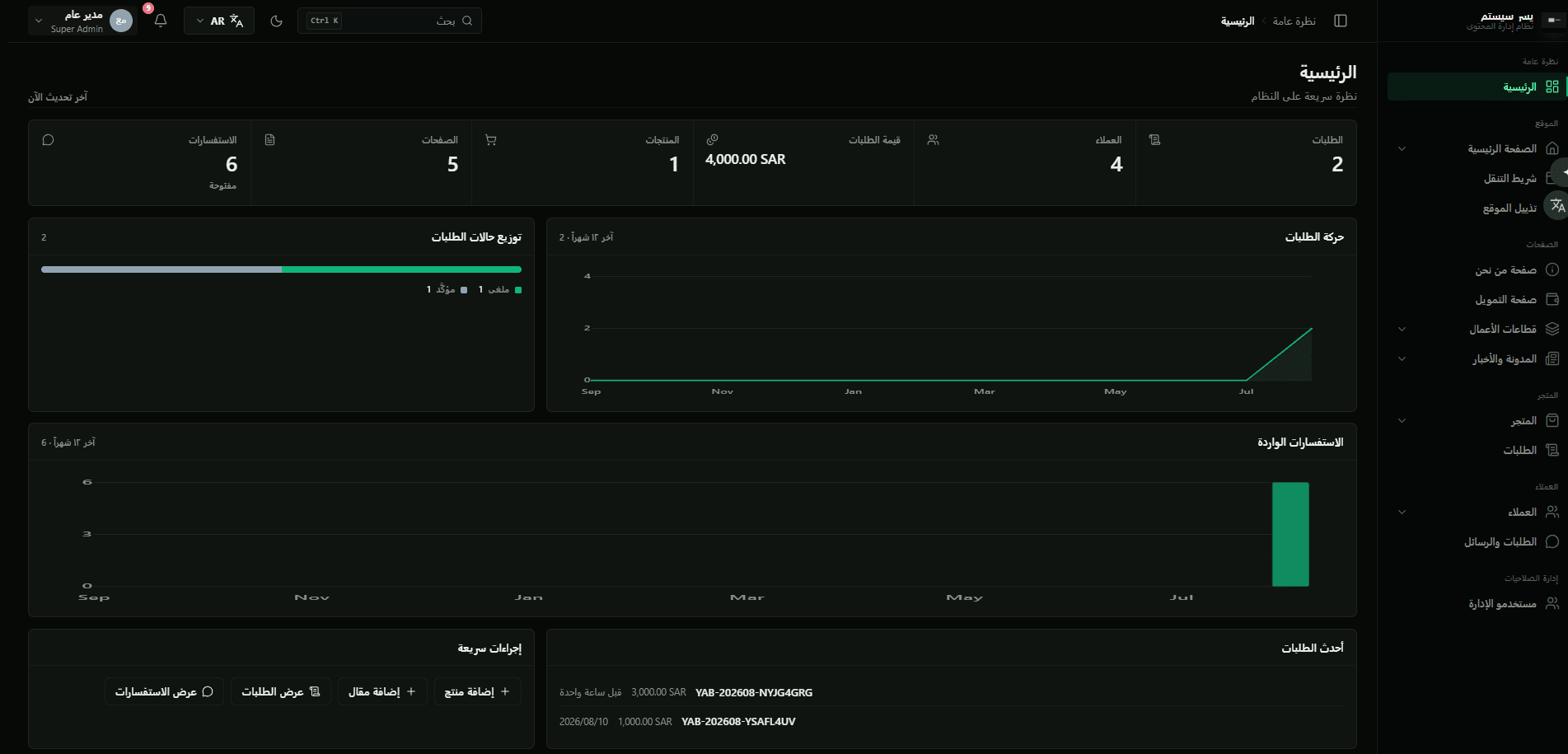
The system at a glance: orders, customers, order value, products, pages and open requests, with order activity, order status mix and incoming enquiries over the last twelve months, recent orders, and quick actions for adding a product or a blog post.
The interface is genuinely bilingual rather than translated in place: switching to Arabic mirrors the entire layout, moves the sidebar and re-renders every label, chart and figure in the other direction.
Slides carry a title, subtitle and image, and each row shows which of the three languages it has, whether it is visible, and whether it is published. Slides can be reordered by drag or by arrows, toggled off, or moved to the archive.
The about-us block, edited per language through Arabic / English / Français tabs. Primary and secondary images are attached with their filenames and dimensions shown, and the statistics strip is an optional toggle capped at six entries.
The section heading is translated per language while the sectors themselves are an ordered list beneath it — each with its own image, language badges, visibility toggle and edit action.
Content, carousel images and benefits for the Noor clean-energy initiative. The screen states its own rule — with only one image, the carousel autoplay is disabled on the public site.
Financing products as ordered, icon-bearing entries. A dash instead of a language badge marks a translation that has not been written yet, so an incomplete entry is visible at a glance rather than discovered on the live site.
The fleet-tracking section, split into content, imagery, features, security systems and safety tabs. The banner is the important part: publishing is blocked until Arabic, English and French are all complete, and the language tabs carry a dot showing which are not.
The section that drives the projects carousel on the homepage, with the same translation gate and an empty state that tells the editor exactly what to add first.
Separate logos for light and dark backgrounds with a live preview of both, plus the brand name, tagline and logo alt text per language — the alt text falls back to the brand name when left empty rather than shipping an unlabelled image.
Brand, newsletter and social accounts as three separate tabs, with light and dark footer logos, a preview that can be flipped between both themes, and per-language company name, bio and copyright line.
The inner About page, kept deliberately distinct from the About section on the homepage: its own hero image, its own vision and mission tab, and its own publishing state.
The sectors landing page — page hero, the sectors it lists, and an operating-capacity tab — again separate from the homepage strip, so the two can say different things.
Each sector gets a full page of its own, with hero, content, images and a journey tab. Adding a sector adds a page; it does not add a code path.
The education sector, built from the same page model as mining but with its own tabs and media — the clearest illustration of why new sectors do not require new templates.
Articles counted by state — all, published, draft and scheduled — searchable by title or slug and filterable by state, category and featured flag.
The taxonomy that groups and filters articles on the public blog, with its own archive so a retired category is hidden rather than deleted out from under its posts.
E-Commerce, CRM & Access Control
The half of the platform that handles money and people: a catalogue and its orders, the customer accounts behind them, every enquiry the public site can produce, and the admin accounts allowed to touch any of it.
The catalogue organised as a browsable tree — the counters separate top-level categories from the total, and each row shows how many products sit under it and whether it is enabled.
Every product across all languages, searchable by name, SKU or slug. The filter row is where the model shows: category, state, availability, pricing, financing, cart eligibility, featured, and — usefully — missing translation. Each row carries its price, availability (including pre-order), stock and which of the three languages it has.
Orders placed from the public site, counted by review, confirmed and completed. Order state, payment state and fulfilment state are three independent columns and three independent filters, because an order can be confirmed, unpaid and not yet prepared all at once.
Accounts registered on the public site, counted by active, awaiting activation and blocked. Searchable by name, email, phone, company or city, and filterable by state, account type, nationality, country, email verification and registration date.
Every enquiry the site can produce lands in one queue: contact messages, quotation requests, consultations, financing applications, fleet-tracking enquiries and maintenance requests. Each carries its type, its contact channel, its state and whether it has been read — which is what stops requests from being lost across separate channels.
Administrator accounts with their role, status, last sign-in and creation date, filterable by role and state. Access control is its own section of the panel rather than a setting buried inside another screen.
External surfaces
Homepage, navbar, footer, company pages, business sectors, the Noor project, financing options and the blog — the public site's entire text and imagery comes from these rather than from files in the repository.
Products, categories, cart, wishlist and orders, so the storefront reads the same catalogue the admin panel edits, with no second copy to keep in sync.
Customer registration, sign-in and session handling for the public site, kept separate from the admin panel's own authentication.
Every public form — contact, quotation, consultation, financing, maintenance — posts through the API into the same CRM queue, which is why the inbox is complete by construction.
The Next.js site consumes these endpoints with Axios. Content published in the CMS appears on the public site without a code change, which was the entire point of the rebuild.
What admins control
Orders, customers, order value, products, pages and open requests, with twelve-month order activity, order status mix and incoming enquiries, recent orders and quick actions.
Homepage sections, navbar and footer — the parts of the site that appear on every page.
About, financing, business sectors with a page per sector, and blog and news with articles, categories and page settings.
Categories, products and orders, each with their own counters, search and filters.
Customer accounts and the business requests inbox, kept together because they are two views of the same relationship.
Admin users with roles and status — its own top-level section, not a settings sub-page.
Hard problems, handled
Three languages across dozens of content blocks meant a section could go live with Arabic written and French missing, and the public site would silently fall back — so the gap only surfaced to a French-speaking visitor.
Translation completeness became a publish condition rather than a convention. The editor sees which languages are missing on the tab itself, and the publish action stays blocked until all three are written.
The original site hardcoded every sector, service and page, so adding one meant new templates, new routes and a deploy.
Pages and sections were modelled as records with a shared page model. A new sector is a row that brings its own hero, content, images and detail page — the mining and education sectors are the same template holding different data.
Enquiries arrived through several unrelated channels, so quotations, consultations, financing and maintenance requests were tracked in different places, or not tracked at all.
Every public form posts through the API into one queue with a type, a state and a read flag. The inbox is complete because there is no other way for a request to enter the system.
A single order status could not express the business reality — an order might be confirmed but unpaid, or paid but not yet prepared.
Order state, payment state and fulfilment state were separated into three fields with three independent filters, so each can move at its own pace and the list stays honest about where an order actually is.
Two frontends — an Inertia admin panel and a Next.js public site — risked becoming two implementations of the same rules.
Rules stayed in Laravel. The admin panel reaches them through Inertia and the public site through the REST API, but neither holds a second copy of validation or authorization logic.
Built to stay fast
Design and interaction
Ready to ship and operate
What it does
Arabic, English and French are edited side by side on every block, with RTL and LTR handled through the whole admin panel and the public site. Publishing is gated on completeness, so a half-translated section cannot reach production and quietly fall back to another language.
Every block carries draft, published and hidden states independently of each other, plus an archive. An editor can prepare a section, keep it out of the live site, and publish it later without deleting or duplicating anything.
Homepage sections and inner pages are separate records rather than the same content shown twice, so the sectors strip on the homepage and the sectors landing page can say different things — and each sector still gets a full page of its own.
Images are attached per block with filenames, dimensions and replace / remove actions, and separate light and dark variants exist wherever a logo has to sit on both backgrounds.
Products and hierarchical categories, cart and wishlist, checkout and orders. Products carry SKU, pricing, availability including pre-order, stock, cart eligibility and a featured flag, and the checkout is structured so a payment provider can be attached without reshaping the order model.
Order state, payment state and fulfilment state are tracked separately, which is what lets the business see that an order is confirmed but unpaid, or paid but not yet prepared, instead of collapsing all of that into one status.
Registered accounts with status, account type, email verification, nationality and location, plus their order history — searchable and filterable rather than only reachable through the order that created them.
Contact messages, quotations, consultations, financing applications, fleet-tracking enquiries and maintenance requests all arrive in one inbox with a type, a state and a read flag, so nothing depends on someone remembering to check a second channel.
The admin panel raises notifications for new orders, incoming requests and system activity, so the queue is something staff are told about rather than something they have to go looking for.
Why we chose what we chose
Inertia for the admin panel, REST for the public site.
Internal screens do not need a public contract, and giving them one would mean maintaining and securing a second API surface for no benefit. The public site does need a contract, so it gets a real REST API.
Model content as records, not as code.
The original site's limitation was that content lived in templates. Making every block, sector, page and article a record with translations and a publish state is what turned content changes from deploys into edits.
Gate publishing on translation completeness.
Silent language fallback hides the problem from the person who can fix it and shows it to the visitor. Blocking the publish moves the discovery to the right place.
Split order, payment and fulfilment state.
One status field forces the business to choose which fact to record. Three fields record all three, and the filters become genuinely useful.
One inbox for every enquiry type.
Requests that arrive through different channels get handled inconsistently. Funnelling all six types through the API into a single queue makes completeness structural rather than a matter of discipline.
Results
Other case studies
Building something similar?
Let's scope your platform — dashboard, mobile apps, APIs, the full stack.